You sent 50 applications last month. You heard back from two. Maybe three if you count the rejection.
That’s not bad luck. That’s a match problem.
Most job seekers apply to everything and hope something sticks. But recruiters in India, especially on Naukri and LinkedIn, spend less than 10 seconds on a resume before deciding if it’s worth calling. If your resume doesn’t match the job description closely enough, it gets skipped. Not because you’re unqualified. Because it doesn’t look like a match at a glance.
The good news is that you can check your resume-to-job description match before you apply. And fixing it takes less time than writing a cover letter nobody reads.
Here’s what we’ll cover:
- Why your resume isn’t getting callbacks even when you’re qualified
- What a resume-job description match score actually measures
- How to use CareerMauka to check your match in seconds
- What to do when your score is low
- How to use the AI job finder to find roles where you actually stand a chance
Why Most Resumes Fail Before a Human Reads Them
Before a recruiter sees your resume, it usually goes through two filters.
The first is an ATS system. It’s software that automatically scans resumes and ranks them based on keyword matches with the job description. If your resume doesn’t have the right words, it gets buried. Companies like TCS, Infosys, Wipro, and most large Indian startups use ATS tools like Workday, Taleo, or Naukri’s own ranking algorithm.
The second filter is the recruiter doing a 10-second skim. Even if your resume makes it through ATS, a recruiter who sees a mismatched job title or missing skill will move on immediately.
Most people write one resume and send it to everything. That’s the problem. A generic resume rarely matches any one job description closely enough to clear both filters.
Key Takeaway: Your resume doesn’t fail because you’re not qualified. It fails because it doesn’t look like an obvious match to someone who has 200 resumes to go through.
This is exactly what a match score helps you fix before you click apply.
What a Resume Match Score Actually Tells You
A match score compares your resume against a specific job description and gives you a number from 0 to 100.
But a good match score tool doesn’t just count keywords. It looks at skills alignment, experience level, job title relevance, and the specific responsibilities mentioned in the JD. Then it tells you where you’re strong and where you’re falling short.
CareerMauka gives you a match score along with three things that most tools skip. You get a callback likelihood rating, a breakdown of why you’re a fit and why you’re not, and a specific list of what to fix before you apply.
The callback likelihood rating is the one that matters most. It tells you whether a recruiter is realistically going to call you based on how your resume looks against that JD. A score of 74 sounds decent. But if your callback likelihood is Low, that means something specific in your resume is working against you, even though the overall score looks okay.
Key Takeaway: A match score above 70 is generally a good sign. Above 85 means you’re a strong candidate. Below 50 means you should either fix your resume or move on to a better-fit role.
Now that you understand what the score measures, let’s walk through how to actually use the tool.
How to Use CareerMauka to Check Your Match Score (Step by Step)
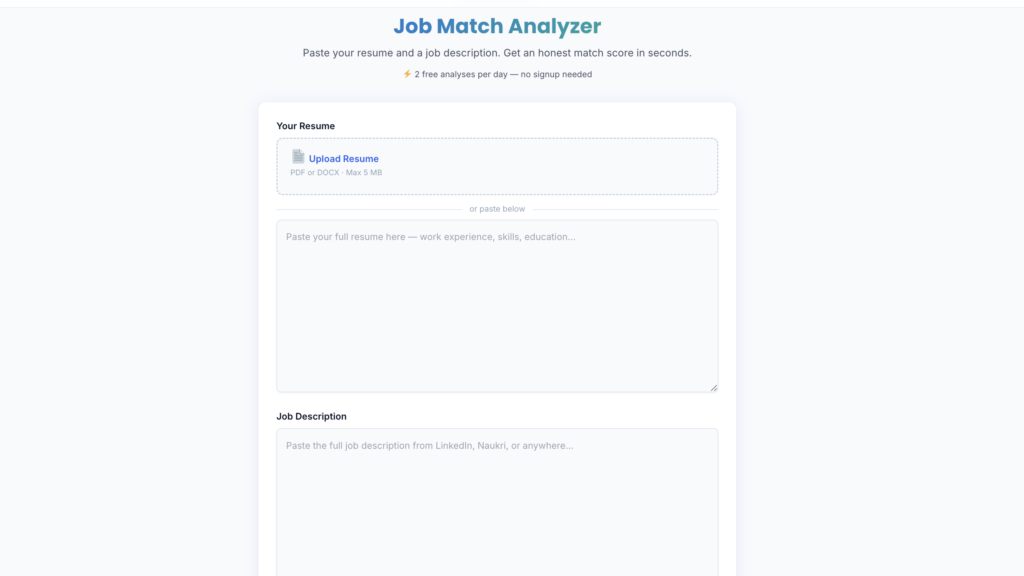
This takes about 60 seconds.
Step 1. Open CareerMauka
Go to careermauka.in and sign in with Google. It’s free. No credit card, no form to fill.
Step 2. Add your resume
You can upload your resume as a PDF or DOCX file, or paste the text directly into the box. Pasting works just as well. If you’re pasting, copy everything from your resume, including contact info, summary, experience, skills, and education.
Step 3. Paste the job description
Open the job posting on LinkedIn, Naukri, Foundit, or anywhere else. Copy the full job description, including the responsibilities and requirements section. Paste it into the second box.
Step 4. Click Analyze
The AI takes about 10 to 15 seconds. You’ll get your match score, callback likelihood, a fit breakdown, a list of gaps, specific fixes, salary insights of both your profile and the job description that you posted, and the exact keywords you’re missing.
Step 5. Read the result carefully
Don’t just look at the number. Read the “Why You’re a Fit” and “Gaps and Mismatches” sections. These tell you what’s working and what a recruiter will notice immediately. The “Fix Before Applying” section is your action list.
Free users get 2 analyses. That’s enough to test a couple of roles and see how the tool works before deciding if you want to go Pro.
What to Do When Your Score is Low
A low score is not a rejection. It’s information.
If your score is between 50 and 70, it usually means you have the experience, but your resume isn’t communicating it in the right language. The fix is usually adding the missing keywords from the JD into your resume naturally, rewriting your summary to reflect the specific role, and making sure your job titles and skill names match the way the job posting phrases them.
If your score is below 50, there are two possibilities. Either the role is genuinely not a good fit, or you’re better off targeting something closer to your experience. Or your resume is written in a way that hides your real qualifications. The “Fix Before Applying” section will tell you which one it is.
One thing most people don’t realize is that even small changes like adding the exact job title from the JD to your resume summary can move your score up by 10 to 15 points.
One thing that helps significantly is quantifying your experience. Instead of “managed social media accounts,” write “managed 5 social media accounts and grew combined followers by 40% in 6 months.” The AI picks up on specificity, and so do recruiters.
Key Takeaway: A low match score tells you exactly what to fix. Most score improvements come from keyword alignment and rewriting your summary, not from adding new sections or redesigning your resume.
How the AI Job Finder Works (Pro Feature)
Once you’ve run a match analysis, you might want to find roles where you actually have a strong fit without having to search manually and run analyses one by one.
That’s what the AI job finder does.
It reads your resume, identifies your job title, top skills, years of experience, and location, and then searches for jobs posted in the last 7 days across LinkedIn, Indeed, Naukri, and other boards. It only shows you roles where your profile is a real match, not a generic list of everything that’s hiring.
This saves time because you’re not wasting your 10 analyses on jobs that turn out to be a 38% match. You already know going in that these roles fit your profile.
The job finder is available in CareerMauka Pro at Rs 99 per month. You get one search per day, which is more than enough for a focused job search.
A Simple Workflow for Your Job Search
Here’s how to put this together into a routine that actually works.
Start every application session with the match tool. Find a role that looks interesting, run your resume against it, and read the result. If the score is above 70 and your callback likelihood is High or Very High, apply as-is. If the score is between 50 and 70, spend 15 minutes updating your resume based on the fixes, then apply. If it’s below 50, skip it and move to the next one.
Over a week of doing this, you’ll apply to fewer jobs but get more responses. Because every application you send is one where your resume actually looks like a match.
If you’re on Pro, run the job finder first to see what roles already fit your profile. Then use your daily analyses to pick the top 5 and check your match before applying to each one.
Which part of your job search do you think is costing you the most callbacks right now, the resume itself or the roles you’re applying for?
Frequently Asked Questions
How do I match my resume to a job description?
Paste your full resume and the complete job description into CareerMauka. The AI compares them and gives you a match score from 0 to 100 along with exact gaps and what to fix. It takes about 15 seconds and tells you more than you’d get from reading both documents yourself.
What is a good resume match score?
For most roles in India, a score above 70 is a solid match. Above 85 means you’re a strong candidate with a high chance of getting a call. Below 50 usually means either the role isn’t the right fit or your resume needs to be rewritten to better reflect your experience.
Why is my match score low even though I’m qualified?
Usually, because your resume uses different language than the job description. If the JD says “revenue operations” and your resume says “sales ops,” the AI picks that up as a gap. Matching the exact terms the company uses is often the fastest way to improve your score without changing your experience.
Is CareerMauka free?
Yes, you get 2 free analyses with no credit card required. Just sign in with Google. For more daily analyses and the AI job finder, Pro is Rs 99 per month.
Does the match score tool work for all industries?
Yes. CareerMauka works for any role in any industry, including IT, marketing, finance, HR, operations, and more. It reads the actual job description you paste in, so it’s always comparing against that specific role rather than a generic template.